
Hello Thinking Nation Teachers,
As teachers settle into the school year, we wanted to take a moment to highlight two Thinking Nation features that can make your classroom run a little smoother. The first is signing in with Google, so students and teachers can log in with their school Google account. The second is AI Essay Detection, which helps you see whether your students' writing is truly their own.
Below, we walk through how to use each one.
One Click In: Sign In with Google
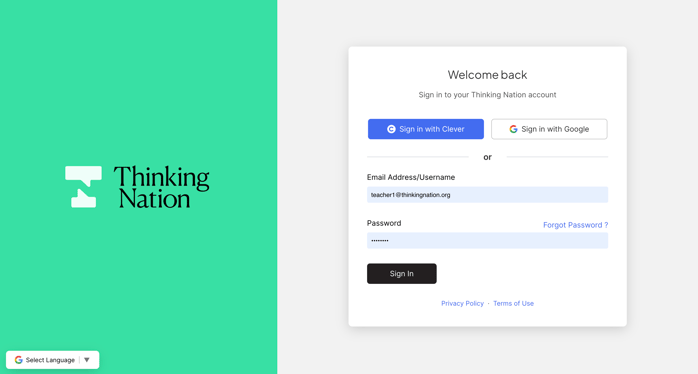
Many of our schools already log in through Clever. If your school uses Google Workspace, you can also sign in with Google, using the same school account students and teachers already use for Gmail, Classroom, and Drive.
To sign in with Google:
- Go to app.thinkingnation.org/login.
- Click Sign in with Google, right next to Sign in with Clever.
- Choose your school Google account (the one ending in your school's domain).
- That's it. You'll land right on your Thinking Nation dashboard.
Clever and email/password sign-in are still available, so every classroom can use whichever option fits its setup best.
 Know Their Thinking Is Their Own: AI Essay Detection
We've always seen technology as a tool, never the focus. From the start, our platform has existed to help students do the deep thinking that history asks of them. Today, AI is part of how we do that, grading essays just seconds after students submit them. But that same technology has also made it easier than ever for students to skip the thinking altogether. (If you'd like to read more about how we got here, check out Thinking Nation and Technology: A History.)
AI Essay Detection helps keep the focus where it belongs. When you turn it on for an assignment, Thinking Nation reviews each student's written response and estimates how much of it was likely written by the student and how much may have come from AI. It's part of our commitment to a platform that keeps the people in the classroom at the center, so the thinking on the page stays your students' own. You choose which assignments to use it on, so it's there whenever you need it.
- Create or assign a CRP as you normally would.
- Set your start date, due date, and the pages you want to assign.
- Scroll to AI Essay Detection and switch the toggle from Disabled to Enabled.
- Click Save.
A quick reminder from the assignment screen: once an assignment is saved, you can't remove pages you've already assigned, though you can always add pages back later. Double-check your page selection before you save.
Reading the AI Detection Report
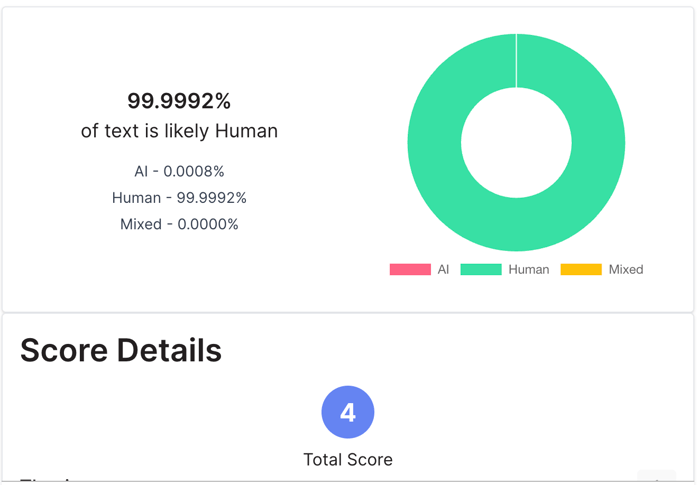
When you open a student's submission, the AI detection results appear right above their Score Details. You'll see three numbers and a color-coded chart:
- Human (green): the share of the text that is likely written by the student.
- AI (red): the share that is likely AI-generated.
- Mixed (yellow): the share that likely blends student writing with AI-generated text.
The headline number tells you the big picture at a glance, for example, "99.9992% of text is likely Human." The chart makes it just as easy to spot when something looks different.
A word on using these results well: AI detection is an estimate, not a verdict. Treat a high AI or Mixed score as the start of a conversation, not the end of one. Ask the student to walk you through their argument, compare the response to their earlier work, or have them talk through how they used the sources.
Once a report is generated, teachers can instantly see visual breakdowns of key rubric categories. These charts help teachers identify patterns quickly, for example, where students are consistently strong and where they may need targeted support, without having to open individual submissions one by one.
Both of these features come from the same place: listening to teachers. Google sign-in clears away the friction at the start of class, and AI Essay Detection gives you confidence that the historical thinking on the page belongs to your students.
Ready to try them? Log in at app.thinkingnation.org, click Sign in with Google, and turn on AI Essay Detection for your next assignment.


Post a comment